
What is Azure Resources and Resource Groups
Table of Content:
Azure accounts
To create and use Azure services, you need an Azure subscription. When you're completing Learn modules, most of the time a temporary subscription is created for you, which runs in an environment called the Learn sandbox. When you're working with your own applications and business needs, you need to create an Azure account, and a subscription will be created for you. After you've created an Azure account, you're free to create additional subscriptions. For example, your company might use a single Azure account for your business and separate subscriptions for development, marketing, and sales departments. After you've created an Azure subscription, you can start creating Azure resources within each subscription.
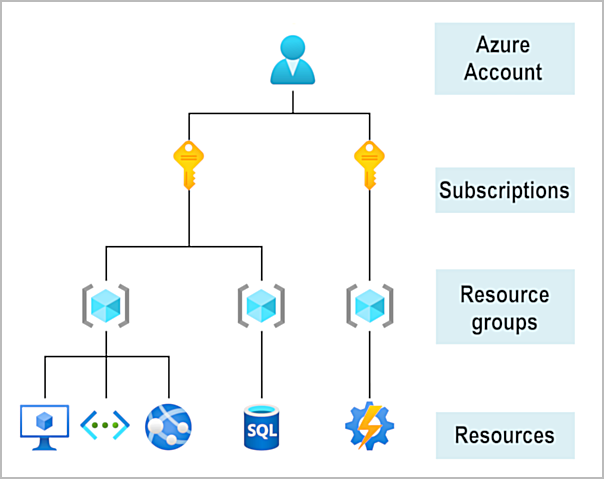
If you're new to Azure, you can sign up for a free account on the Azure website to start exploring at no cost to you. When you're ready, you can choose to upgrade your free account. You can also create a new subscription that enables you to start paying for Azure services you need beyond the limits of a free account.
Azure Resources and Resource Groups
-
Resource Definition:
- A resource is the basic building block in Azure.
- Examples of resources include Virtual Machines (VMs), virtual networks, databases, and cognitive services.
-
Resource Groups:
- A resource group is a logical container for grouping related Azure resources.
- When a resource is created, it must be assigned to a resource group.
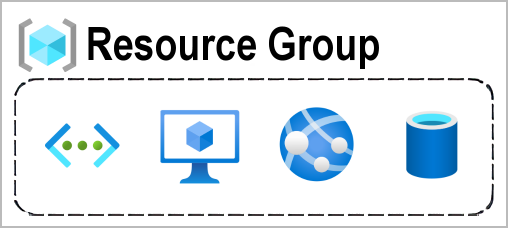
Figure: Azure resources and resource groups
-
Single Group Association:
- A resource can only belong to one resource group at a time.
- Some resources can be moved to a different group, but once moved, they are disassociated from the previous group.
-
No Nesting of Resource Groups:
- Resource groups cannot be nested; one resource group cannot be placed inside another.
-
Benefits of Resource Groups:
- Actions applied to a resource group affect all resources within it (e.g., deletion or permission management).
- Deleting a resource group deletes all the resources it contains.
- Granting or denying access to a resource group affects all the resources inside.
-
Strategic Grouping:
- Grouping resources can be based on different factors such as access control, project type, or environment (e.g., dev, production).
- For example, you can group all resources for a temporary dev environment together and deprovision them by deleting the resource group.
-
Flexibility:
- Azure offers flexibility in organizing resource groups.
- There are no strict rules; users can structure their resource groups in ways that best fit their needs.
- Introduction: Highlighted the importance of Azure certifications for beginners and cloud professionals.
- Course Overview: Provided detailed insights into the topics covered, such as Azure cloud services, pricing, support, and core cloud concepts.
- Target Audience: The course is ideal for students, IT professionals, and individuals looking to start a cloud computing career.
- Practice Tests: Offer sample practice questions and mock exams to simulate the AZ-900 test experience.
- Benefits: Get benefits of getting Azure certified, including career opportunities and the growth of cloud computing.