- AYou can use var to declare local variables for declarations of for loop counters
- BYou can declare a variable wherever statements can be provided.
- CYou can declare a variable after the variable is used.
- DYou can declare variables in smaller scopes, outside which the variables can’t be referenced.
What is Chain of Command (CoC)? - Quiz
- AImplement event handlers for the required events to inject custom business logic.
- BUse the Chain of Command (CoC) to extend the functionality of existing methods.
- CCreate a new class extension to encapsulate the business logic.
- DA, B, C
- ANo
- BYes
- COnly if the method is also marked as Wrappable(true)
- DOnly if the method is not final
- AImplement Chain of Command (CoC) in an extension class
- BUse event handlers only
- CCreate a new class with the same method
- DModify the base class method directly


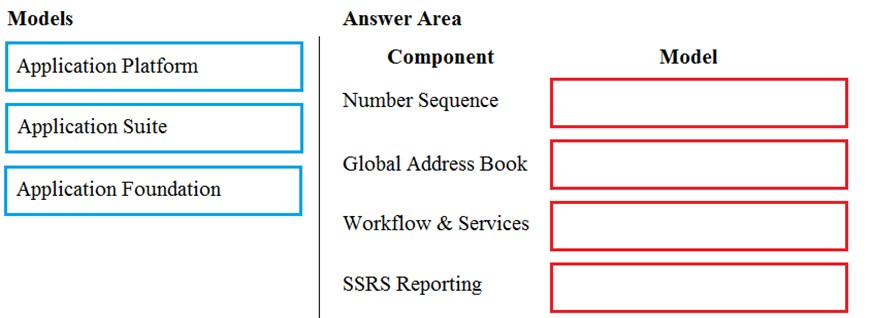
- AApplication Foundation,Application Foundation,Application Platform,Application Platform
- BApplication Platform,Application Foundation,Application Foundation,Application Platform,
- AA retailer requires all new customer data captured at point of sale (POS) terminals through the day sent back to the system.
- BA retailer wants to ensure gift card balances are communicated back to the system from point of sale (POS) terminals in near real-time.
- CA manufacturer wants to move production data from an on-premises deployment Dynamics 365 Finance in near real-time.
- DA warehouse wants to track movement of all inventory from scanners to the system.
Results:
🟢 Correct Answers: 🔴 Wrong Answers:
🟢 Correct Answers: 🔴 Wrong Answers:
Login to save results
Quiz Information
Quiz Information
Quiz Platform FAQ
General Information
- Number of Questions: Each quiz consists of 10 questions.
- Time Limit: You have 30 seconds per question. The total time to complete the quiz is 5 minutes.
- Multiple Attempts: You can take the quiz multiple times to improve your score.
Results and Feedback
- Result Analysis: After completing the quiz, you will see a results page with the following details:
- Correct Option for each question.
- Your Selected Option for each question.
- Explanation for each answer to help you understand why it is correct or incorrect.
- Percentage of Correct Answers to show your overall performance.
- Interactive Features: The platform provides feedback on each attempt to help you learn and improve.
Important Instructions
- Do Not Refresh: Do not refresh the page while taking the quiz. Refreshing the page will end the current quiz and a new quiz will start.
- Saving Your Quiz: To save your quiz progress and questions, log in to your account. Once logged in, you can view saved quizzes in your profile section.
- Mandatory Selection: All questions are mandatory to select. If you do not select all 10 questions, you will not be able to submit the quiz. Once all questions are selected, you will be able to see the Submit button. If you wait until the end of the time, the quiz will be auto-submitted by the system, and you will be able to see your results.
Tips for Taking the Quiz
- Manage Your Time: Keep track of the time for each question to ensure you have enough time to answer all 10 questions.
- Review Explanations: After the quiz, read the explanations provided for each answer to enhance your understanding of the material.
- Retake the Quiz: If desired, take the quiz again to improve your score and reinforce your learning.
- Avoid Refreshing: To prevent losing progress, avoid refreshing the page during the quiz.
- Log In to Save: If you want to save your quiz progress, log in to your account and check your profile section for saved quizzes.
Quiz Analytics
What is Chain of Command (CoC)? - Quiz
Guest User Time Taken:
 Questions: Answered: Not Answered:
 Correct Answer:
 Wrong Answer:
 Percentage: %
- A. You can use var to declare local variables for declarations of for loop counters
- B. You can declare a variable wherever statements can be provided.
- C. You can declare a variable after the variable is used.
- D. You can declare variables in smaller scopes, outside which the variables can’t be referenced.
Remarks:
Explanation:
You can declare a variable after the variable is used. This statement is NOT true. You cannot declare a variable after it is used in code.
- A. Implement event handlers for the required events to inject custom business logic.
- B. Use the Chain of Command (CoC) to extend the functionality of existing methods.
- C. Create a new class extension to encapsulate the business logic.
- D. A, B, C
Remarks:
Explanation:
Wrong: Create a new table in the database to handle the business logic separately.
Wrong:Modify the base class directly to include the new business logic.
Wrong:Copy the existing method into a new class and add the custom business logic.
Creating a new class extension (E) allows for adding custom business logic without modifying the original base class, which aligns with best practices for maintainability and upgradeability. Using the Chain of Command (D) is a recommended approach to extend the functionality of existing methods without altering the original code. Implementing event handlers (C) is a non-intrusive way to add custom logic that responds to specific application events. Modifying the base class directly (B) is not recommended as it can lead to issues during updates. Copying an existing method into a new class (F) is not a best practice as it can create redundant code and maintenance challenges. Creating a new table in the database (A) is not related to adding business logic within the application code and could lead to unnecessary complexity.
Elements, models, and packages - Training | Microsoft Learn
Development tools in Visual Studio - Finance & Operations | Dynamics 365 | Microsoft Learn
- A. No
- B. Yes
- C. Only if the method is also marked as Wrappable(true)
- D. Only if the method is not final
Remarks:
Explanation:
If a method is explicitly marked as [Hookable(false)], the method can't be wrapped in an extension class. The Wrappable attribute and whether the method is final do not affect this restriction.
Public and protected methods that are marked as final can't be wrapped in extension classes. You can override this restriction by using the Wrappable attribute and setting the attribute parameter to true ([Wrappable(true)]). Similarly, to override the default capability for (non-final) public or protected methods, you can mark those methods as non-wrappable ([Wrappable(false)]).
- A. Implement Chain of Command (CoC) in an extension class
- B. Use event handlers only
- C. Create a new class with the same method
- D. Modify the base class method directly
Remarks:
Explanation:
Chain of Command (CoC) allows you to wrap X++ code around methods that are defined in the base class. This allows you to add custom logic that will run before and/or after the standard code runs. Modifying the base class method directly is not recommended as it can lead to issues during updates. Creating a new class with the same method does not extend the base class functionality. Using event handlers only does not allow adding custom logic before and after the base method execution.
- A. 3, 2, 1, 4
- B. 4, 2, 1, 3
- C. 1, 2, 3, 4
Remarks:
Explanation:
Step 1:Open the customer form and apply filters to the grid.
To add a list to a workspace, first sort or filter the list on the page so that it shows the information as you want it to appear in the workspace.
Step2:Select the Options actions pane tab and then select Add to workspace
step3: Select Workspace and Presentation options
Step 4: Select Configure -
After you select Configure, a dialog box appears, where you can select the columns that should appear in the list in the workspace.
- A. 3, 2, 1
- B. 1,2,3
Remarks:
Explanation:
Box 1: User Acceptance Testing (UAT) and Build
Box 2: User Acceptance Testing (UAT) Only
Not all environments contain all the tools. The following table shows the tools that are available for each type of environment.
Box 3: User Acceptance Testing (UAT) and Build
- A. Yes
- B. No
Remarks:
Explanation:
No". The Simple List pattern doesn't have a slot for adding a tab, and trying to add a tab control will cause the form to no longer be compliant with the Simple List pattern, even though it still compiles.
- A. Application Foundation,Application Foundation,Application Platform,Application Platform
- B. Application Platform,Application Foundation,Application Foundation,Application Platform,
Remarks:
Explanation: Application Foundation,
Application Foundation,
Application Platform,
Application Platform
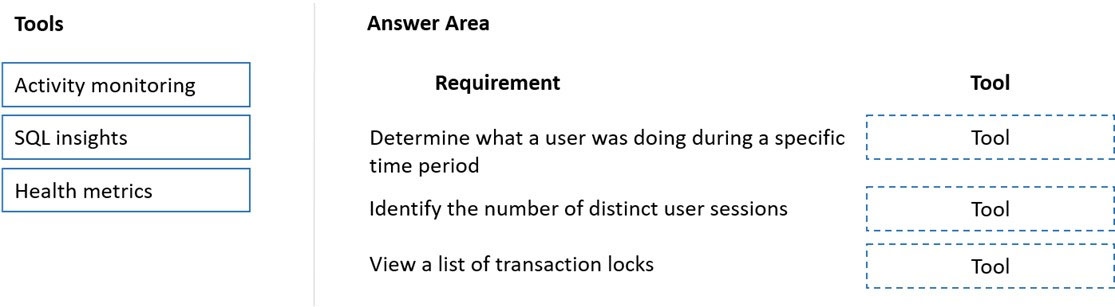
- A. A,C,B
- B. A,B,C
Remarks:
Explanation: Reference:
https://docs.microsoft.com/en-us/dynamics365/fin-ops-core/dev-itpro/lifecycle-services/monitoring-diagnostics https://docs.microsoft.com/en-us/dynamics365/fin-ops-core/dev-itpro/lifecycle-services/performancetroubleshooting
- A. A retailer requires all new customer data captured at point of sale (POS) terminals through the day sent back to the system.
- B. A retailer wants to ensure gift card balances are communicated back to the system from point of sale (POS) terminals in near real-time.
- C. A manufacturer wants to move production data from an on-premises deployment Dynamics 365 Finance in near real-time.
- D. A warehouse wants to track movement of all inventory from scanners to the system.
Remarks:
Explanation:
An asynchronous pattern is a non-blocking pattern, where the caller submits the request and then continues without waiting for a response.
Typical scenarios and patterns that use batch data integrations (asynchronous pattern)
Here is a typical scenario that uses batch data APIs.
Import large volumes of sales orders
A company receives a large volume of sales orders from a front-end system that runs on-premises. These orders must periodically be sent to the application for processing and management.
Incorrect:
Not B, Not C, Not D: A synchronous pattern is a blocking request and response pattern, where the caller is blocked until the callee has finished running and gives a response.
Reference:
https://docs.microsoft.com/en-us/dynamics365/fin-ops-core/dev-itpro/data-entities/integration-overview