/**
* C program to find area of a triangle if base and height are given
*/
#include <stdio.h>
int main()
{
float base, height, area;
/* Input base and height of triangle */
printf("Enter base of the triangle: ");
scanf("%f", &base);
printf("Enter height of the triangle: ");
scanf("%f", &height);
/* Calculate area of triangle */
area = (base * height) / 2;
/* Print the resultant area */
printf("Area of the triangle = %.2f sq. units", area);
return 0;
}
Output
Enter base of the triangle: 10
Enter height of the triangle: 15
Area of the triangle = 75.00 sq. units
Arithmetic operator, Variables and expressions, Data types, Basic input/output
Area of a triangle is given by formula.
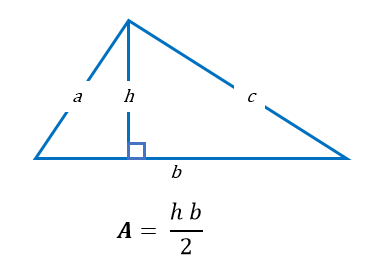
Where b is base and h is height of the triangle.
Below is the step by step descriptive logic to find area of a triangle.
area = (base * height) / 2.%.2f is used to print fractional values only up to 2 decimal places. You can also use %f to print up to 6 decimal places by default.
First read the algorithm, then study the program code line by line. After that, compare the code with the output and finally go through the explanation. This approach helps learners understand both the logic and the implementation properly.
After understanding this example, try to rewrite the same program without looking at the code. Then change some values or logic and run it again. This helps improve confidence and keeps learners engaged on the page for longer.