Home / Programs / Write the HTML code for the following form Figure:
🚀 Programming Example

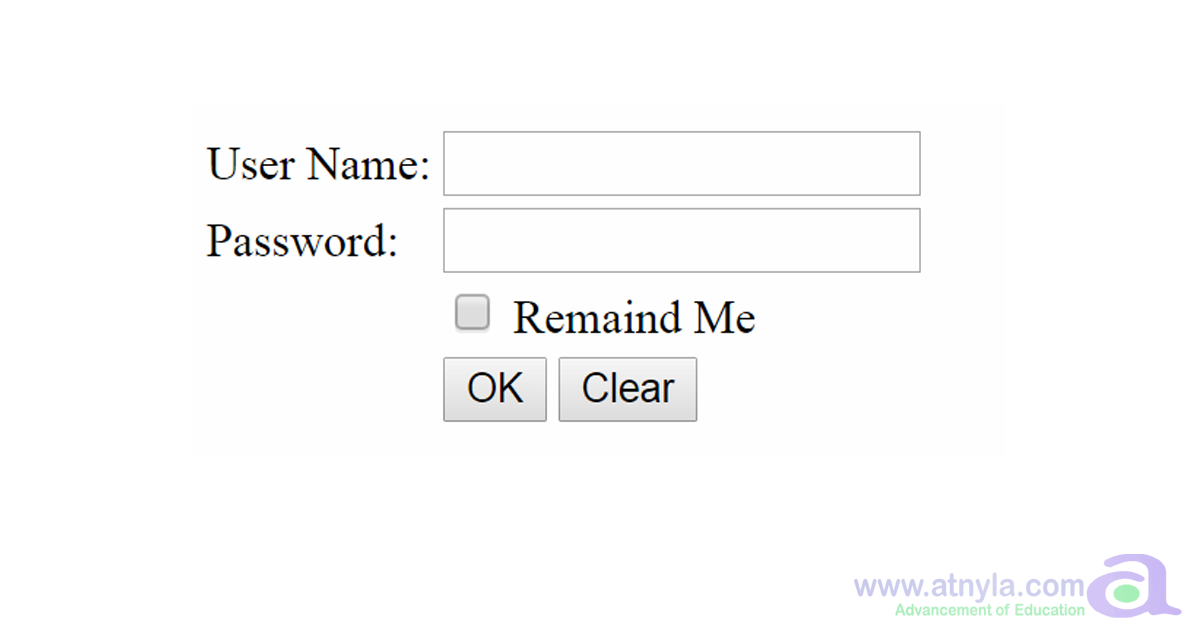
Write the HTML code for the following form
Figure:

👁 866 Views
💻 Practical Program
📘 Step Learning
Write the HTML code for the following form

💻 Program Code

<form>
<table>
    <tr>
	    <td> User Name:</td>
		<td> <input type = "text" name = "first_name" > </td> 
	</tr>	
	<tr>
		<td> Password: </td>
		<td> <input type = "text" name = "last_name" > </td>
	</tr>
	
	<tr>
	   <td></td>
	    <td> <input type = "checkbox" id = "chkPeace" value = "peace"> Remaind Me</td>
	</tr>	
    <tr>	
	   <td></td>
       <td>
	    <input type="submit" name="submit" value="OK">  
	   <input type="reset" value="Clear"> </td>
	<tr>
</table>	
</form>
                        

📘 Explanation

Live Preview

📚 Learning Subject

Master Programming Through Practical Examples

Improve your coding logic, problem-solving skills and programming confidence by practicing real-world examples with explanations.

🎯 How to learn from this example

First understand the algorithm carefully. Then study the program line-by-line and compare it with the output. Finally, review the explanation section to strengthen your logic and programming understanding.

🔥 Practice suggestion

Rewrite the program without looking at the code. Modify values, conditions or logic and run it again. This helps improve confidence and strengthens coding skills much faster.