Understanding Java Tokens: Definitions and Examples
Java program is basically a collection of classes. But it have a basic building blocks, these basic buildings blocks in Java language which are constructed together to write a java program. This basic building blocks are called Token.
Each and every smallest individual units in a Java program are known as C tokens
Simply we can say that java program is also collection of tokens, comments and whitespaces.
In Java Programming tokens are of six types. They are

| No | Token Type | Example 1 | Example 2 |
|---|---|---|---|
| 1 | Keyword | int | for |
| 2 | Constants | height | sum |
| 3 | Identifier | -443 | 43 |
| 4 | String | "Hello" | "atnyla" |
| 5 | Special Symbol | * | @ |
| 6 | Operators | * | ++ |
| Token | Meaning |
|---|---|
| Keyword | A variable is a meaningful name of data storage location in computer memory. When using a variable you refer to memory address of computer |
| Constant | Constants are expressions with a fixed value |
| Identifier | The term identifier is usually used for variable names |
| String | Sequence of characters |
| Special Symbol | Symbols other than the Alphabets and Digits and white-spaces |
| Operators | A symbol that represents a specific mathematical or non-mathematical action |
Keyword
Keywords are an special part of a language definition. Keywords are predefined, reserved words used in programming that have special meanings to the compiler. These meaning of the keywords has already been described to the java compiler. These meaning cannot be changed. Thus, the keywords cannot be used as variable names because that would try to change the existing meaning of the keyword, which is not allowed. Keywords are part of the syntax and they cannot be used as an identifier. But one can change these words as identifiers by changing one or more letters to upper case, How ever this will be a bad practice so we should avoid that.
Java language has reserved 50 words as keywords
All the Keywords are written in lower-case letters. Since java is case-sensitive
int distance ;
int roll_mo ;
float area ;
Here, int, float are a keyword that indicates 'distance', 'roll_no', 'area' are a variable of type integer.
Java Language Keywords
Here is a list of keywords in the Java programming language. You cannot use any of the following
as identifiers in your programs. The keywords const and goto are reserved,
even though they are not currently used. true, false,
and null might seem like keywords, but they are actually literals; you
cannot use them as identifiers in your programs.
abstract |
continue |
for |
new |
switch |
assert*** |
default |
goto* |
package |
synchronized |
boolean |
do |
if |
private |
this |
break |
double |
implements |
protected |
throw |
byte |
else |
import |
public |
throws |
case |
enum**** |
instanceof |
return |
transient |
catch |
extends |
int |
short |
try |
char |
final |
interface |
static |
void |
class |
finally |
long |
strictfp** |
volatile |
const* |
float |
native |
super |
while |
| * | not used | |
| ** | added in 1.2 | |
| *** | added in 1.4 | |
| **** | added in 5.0 |
Learn More about Keywords
Identifiers
Identifiers are the names of variables, methods, classes, packages and interfaces
Identifier must follow some rules. Here are the rules:
- All identifiers must start with either a letter( a to z or A to Z ) or currency character($) or an underscore.
- They must not begin with a digit
- After the first character, an identifier can have any combination of characters.
- A Java keywords cannot be used as an identifier.
- Identifiers in Java are case sensitive, foo and Foo are two different identifiers.
- They can be any length
Each variable has a name by which it is identified in the program. It's a good idea to give your
variables mnemonic names that are closely related to the values they hold. Variable names can
include any alphabetic character or digit and the underscore _. The main restriction on the
names you can give your variables is that they cannot contain any white space. You cannot begin
a variable name with a number. It is important to note that as in C but not as in Fortran or Basic,
all variable names are case-sensitive. MyVariable is not the same
as myVariable. There is no limit to the length of a Java variable name.
The following are legal variable names:
MyVariablemyvariableMYVARIABLExi_myvariable$myvariable_9pinsandros??????OReillyThis_is_an_insanely_long_variable_name_that_just_keeps_going_and_going_and_going_and_well_you_get_the_idea_The_line_breaks_arent_really_part_of_the_variable_name_Its_just_that_this_variable_name_is_so_ridiculously_long_that_it_won't_fit_on_the_page_I_cant_imagine_why_you_would_need_such_a_long_variable_name_but_if_you_do_you_can_have_it
The following are not legal variable names:
My Variable // Contains a space9pins // Begins with a digita+c // The plus sign is not an alphanumeric charactertesting1-2-3 // The hyphen is not an alphanumeric characterO'Reilly // Apostrophe is not an alphanumeric characterOReilly_&_Associates // ampersand is not an alphanumeric character
If you want to begin a variable name with a digit, prefix the name you'd like to have (e.g. 8number) with an underscore, e.g. _8number. You can also use the underscore to act like a space in long variable names.
classes and interfaces start with a leading uppercase, the second and subsequent words are marked with a leading uppercase letters.
Examples:Employee
Area
Animal
MotorCycle
FurnitureLength
etc.public methods and instance variables starts with a leading lowercase letters.
Examples:suma
area
addition
multiplication
etc.When more than one words are in a name, the scond and subsequent words are marked with a leading uppercase letters.
Examples:areaCircle
buisnessName
averageResult
etc.Private and local variables use only lowercase combined with underscore.
Examples:volume
area_circle
distance_moon
etc.Variables that represents constant values use all uppercse letters and underscore between words
Examples:TOTAL_MARKS
GROSS_SALARY
PI_VALUE
etc.These are not rules but these are conventions.
Constants or Literals
Literals in java are sequence of characters (digits, letters and other characters) that represent constant values to be stored in variables. Java language specifies five major type of literals. They are below :
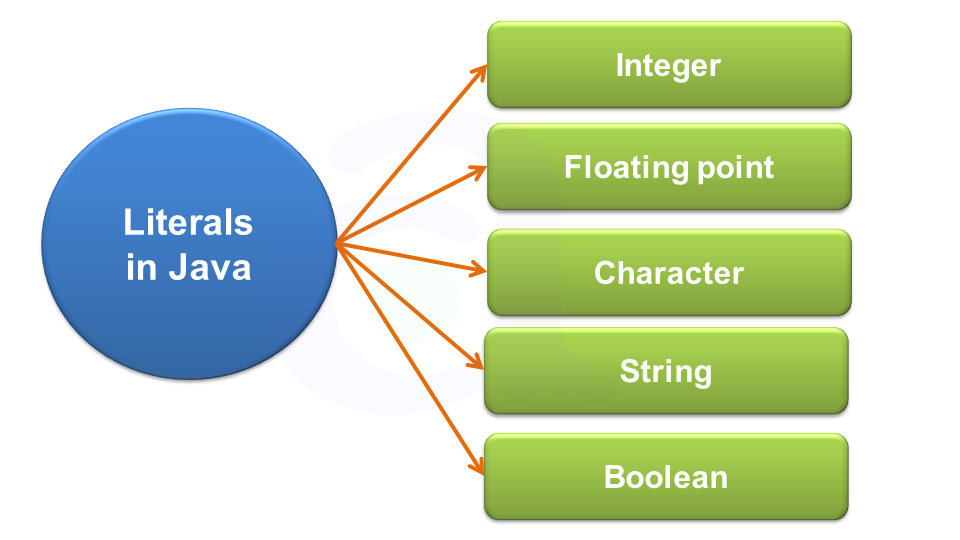
| Constant | Type of Value Stored |
|---|---|
| Integer Literals | Literals which stores integer value |
| Floating Literals | Literals which stores float value |
| Character Literals | Literals which stores character value |
| String Literals | Literals which stores string value |
| Boolean Literals | Literals which stores true or false |
Learn More about literals or Constant
String
In C and C++, strings are nothing but an array of characters ended with a null character (‘\0’).This null character indicates the end of the string. Strings are always enclosed in double quotes. Whereas, a character is enclosed in single quotes in C and C++.Declarations for String:
- char string[20] = {‘g’, ’e’, ‘e’, ‘k’, ‘s’, ‘f’, ‘o’, ‘r’, ‘g’, ’e’, ‘e’, ‘k’, ‘s’, ‘\0’};
- char string[20] = "atnyla";
- char string [] = "atnyla";
In java, string is basically an object that represents sequence of char values. An array of characters works same as java string. For example:
- char[] ch={'a','t','n','y','l','a'};
- String s=new String(ch);
is same as:
- String s="atnyla";
Java String class provides a lot of methods to perform operations on string such as compare(), concat(), equals(), split(), length(), replace(), compareTo(), intern(), substring() etc.
Learn More about Strings
Special symbol
The following special symbols are used in C having some special meaning and thus, cannot be used for some other purpose.[] () {}, ; * = #
| , | < | > | . | _ |
| ( | ) | ; | $ | : |
| % | [ | ] | # | ? |
| ' | & | { | } | " |
| ^ | ! | * | / | | |
| - | \ | ~ | + |
- Brackets[]: Opening and closing brackets are used as array element reference. These indicate single and multidimensional subscripts.
- Parentheses(): These special symbols are used to indicate function calls and function parameters.
- Braces{}: These opening and ending curly braces mark the start and end of a block of code containing more than one executable statement.
- semicolon (; ): It is used to separate more than one statements like in for loop is separates initialization, condition, and increment.
- comma (,): It is an operator that essentially invokes something called an initialization list.
- an asterisk (*): It is used for mutiplication.
- assignment operator (=): It is used to assign values.
- preprocessor(#): The preprocessor is a macro processor that is used automatically by the compiler to transform your program before actual compilation.
Operators
An operator is a symbol that takes one or more arguments and operates on them to produce a result. Operators are of many types and are considered in operator chapter
There are many types of operators in java which are given below:
- Unary Operator,
- Arithmetic Operator,
- shift Operator,
- Relational Operator,
- Bitwise Operator,
- Logical Operator,
- Ternary Operator and
- Assignment Operator.
