🚀 Programming Example
Print Current Date and Time
Learn this program step-by-step with algorithm, source code, output and detailed explanation.
/// <summary>
/// Print Current Date and Time.
/// </summary>
internal final class Ansari004_PrintDateTime
{
    public static void main(Args _args)
    {
        date        todayDate = today();
        utcdatetime nowUtc    = DateTimeUtil::utcNow();

        info(strFmt("Session date : %1", todayDate));
        info(strFmt("UTC date-time: %1", nowUtc));
        info(strFmt("System date  : %1", DateTimeUtil::getSystemDate(DateTimeUtil::getUserPreferredTimeZone())));
    }

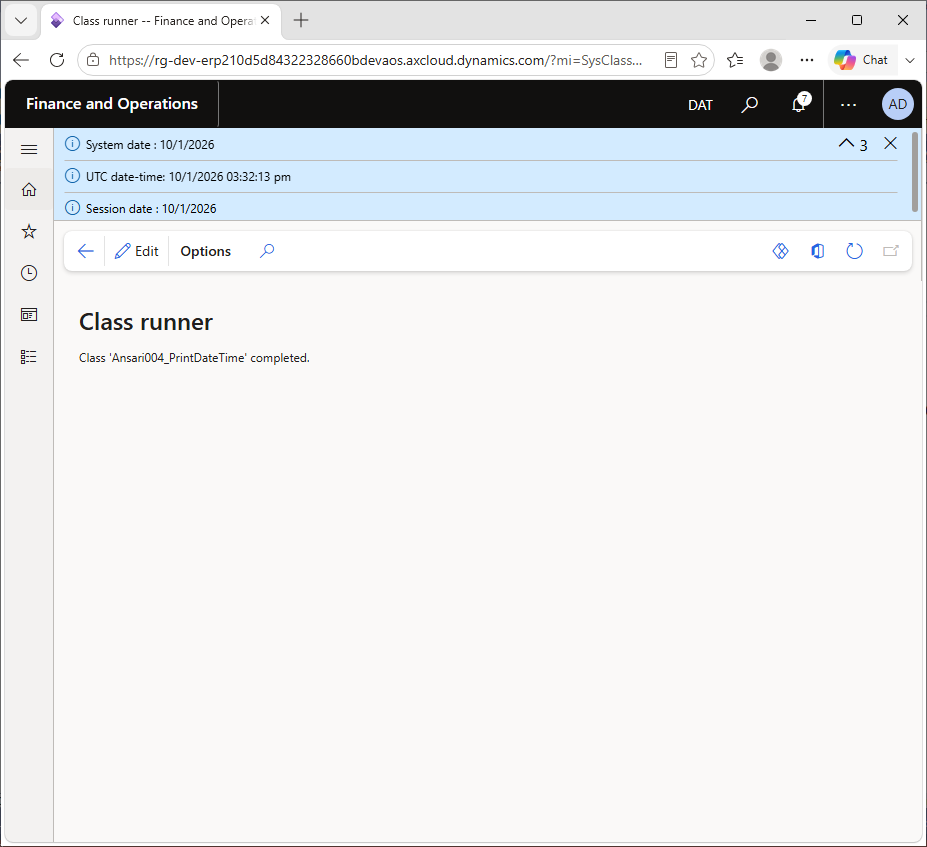
}
Dates and times are everywhere in ERP: posting dates, delivery dates, created and modified timestamps, batch schedules. D365 F&O has more than one idea of "now", and mixing them up is a classic source of bugs. This program prints three values side by side: the session date, the current UTC date-time, and the system date in the user's time zone.
Understanding the difference is important because D365 F&O stores every utcDateTime in UTC in the database and converts it to the user's time zone only when it is shown on screen.
1. Reading the session date
date todayDate = today();today() returns the session date as a date (no time part). The session date can be changed by the user in Settings > Session date and time, which is useful for testing month-end postings. The variable is named todayDate so it does not hide the today() function.
2. Reading the current UTC date-time
utcdatetime nowUtc = DateTimeUtil::utcNow();DateTimeUtil::utcNow() returns the real current moment in UTC as a utcdatetime, including hours, minutes and seconds. It ignores the session date setting. The variable names are aligned, which is a common formatting convention that makes declarations easy to scan.
3. Printing the session date and the UTC date-time
info(strFmt("Session date : %1", todayDate));
info(strFmt("UTC date-time: %1", nowUtc));
strFmt() formats dates using the user's regional settings, so 9/29/2026 may appear as 29-09-2026 for another user. Note that the UTC value is shown as stored, without a time-zone conversion.
4. Printing the system date in the user's time zone
info(strFmt("System date : %1", DateTimeUtil::getSystemDate(DateTimeUtil::getUserPreferredTimeZone())));getUserPreferredTimeZone() returns the time zone from the user options, and getSystemDate() returns today's real date in that zone. This is the value Microsoft recommends instead of today() in production code, because it is not affected by the session date and it respects the user's time zone (near midnight, the UTC date and the local date can differ).
date vs utcdatetime: date holds only a calendar date. utcdatetime holds date and time in UTC.today() reads. Users can change it, so do not use it for audit timestamps.utcdatetime: utcNow(), newDateTime(), addDays(), addHours(), getDifference(), applyTimeZoneOffset() and more.CreatedDateTime are saved in UTC and converted for display, so users in India and the USA see the same moment in their own local time.Session date : 9/29/2026
UTC date-time: 9/29/2026 02:30:00 pm
System date : 9/29/2026The actual values depend on when you run the program, the session date setting and your time zone. The date format follows your user options.
DateTimeUtil::getSystemDate(DateTimeUtil::getUserPreferredTimeZone()) for "today" in business logic.DateTimeUtil::utcNow() for timestamps and duration calculations.today. It hides the built-in function.utcdatetime field. Save UTC, and convert only for display.today() and suggest getSystemDate().today() returns the session date, which users can change. getSystemDate() returns the real date in the given time zone.DateTimeUtil::applyTimeZoneOffset(value, DateTimeUtil::getUserPreferredTimeZone()).DateTimeUtil::date(myDateTime). Use DateTimeUtil::time() for the time part in seconds.DateTimeUtil::minValue(), which is 1900-01-01 00:00:00.First understand the algorithm carefully. Then study the program line-by-line and compare it with the output. Finally, review the explanation section to strengthen your logic and programming understanding.
Rewrite the program without looking at the code. Modify values, conditions or logic and run it again. This helps improve confidence and strengthens coding skills much faster.
Sign in to save your progress and continue exactly where you left off.