Home / Programs / Add a new column from an existing column with a calculation from the previous column
Programming Example

Add a new column from an existing column with a calculation from the previous column

👁 366 Views
💻 Practical Program
📘 Step by Step Learning

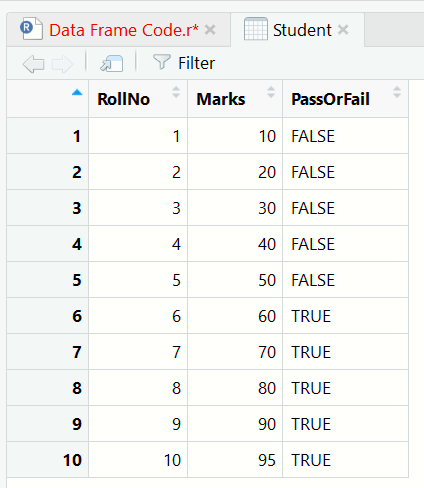
Here we have an existing column present in the data frame. from the existing column Marks, we will create a new column whose values will the calculated value from the Marks column. And the name of the new column will be NewMarks. data frame, r language
Program Code

# input code

Student <- data.frame(
RollNo = 1:10,  
Marks = c(10, 20, 30, 40, 50, 60, 70, 80, 90, 95), 
PassOrFail = c(F, F, F, F, F, T, T, T, T, T))

# code for output

> # add marks to each student and creating a new column
> Student$NewMarks <- Student$Marks + 5

Output

<img src="/library/images-tutorials/add-a-new-column-data-frame-calculation.png" alt="data frame, r language" class="img-responsive">
> str(Student)
'data.frame':	10 obs. of  5 variables:
 $ RollNo     : int  1 2 3 4 5 6 7 8 9 10
 $ Marks      : num  10 20 30 40 50 60 70 80 90 95
 $ PassOrFail : logi  TRUE TRUE TRUE TRUE TRUE TRUE ...
 $ StudentName: chr  "Rumman" "Inza" "Jaman" "Azam" ...
 $ NewMarks   : num  15 25 35 45 55 65 75 85 95 100

Explanation

Here, in this case, we will add a column from the existing column. We will add 5 marks of each student for the wrong question. Extra marks will be added for each student. We will create a new column NewMarks.

How to learn from this program

First read the algorithm, then study the program code line by line. After that, compare the code with the output and finally go through the explanation. This approach helps learners understand both the logic and the implementation properly.