Advantages of Using Views in SQL Server: A Comprehensive Guide
What is a View?
A view is nothing more than a saved SQL query. A view can also be considered as a virtual table.
Let's understand advantages of views with an example. We will base all our examples on tblEmployee and tblDepartment tables.
SQL Script to create tblEmployee table:
Drop table tblEmployee
CREATE TABLE tblEmployee
(
  Id int Primary Key,
  Name nvarchar(30),
  Salary int,
  Gender nvarchar(10),
  DepartmentId int
)
SQL Script to create tblDepartment table:
Drop table tblDepartment
CREATE TABLE tblDepartment
(
 DeptId int Primary Key,
 DeptName nvarchar(20)
)
Insert data into tblDepartment table
Insert into tblDepartment values (1,'IT')
Insert into tblDepartment values (2,'Payroll')
Insert into tblDepartment values (3,'HR')
Insert into tblDepartment values (4,'Admin')
Insert data into tblEmployee table
Insert into tblEmployee values (1,'Rambo', 5000, 'Male', 3)
Insert into tblEmployee values (2,'Azam', 3400, 'Male', 2)
Insert into tblEmployee values (3,'Zoe', 6000, 'Female', 1)
Insert into tblEmployee values (4,'Inza', 4800, 'Male', 4)
Insert into tblEmployee values (5,'Sofia', 3200, 'Female', 1)
Insert into tblEmployee values (6,'Samser', 4800, 'Male', 3)
At this point Employees and Departments table should look like this.

Now, let's write a Query which returns the output as shown below:
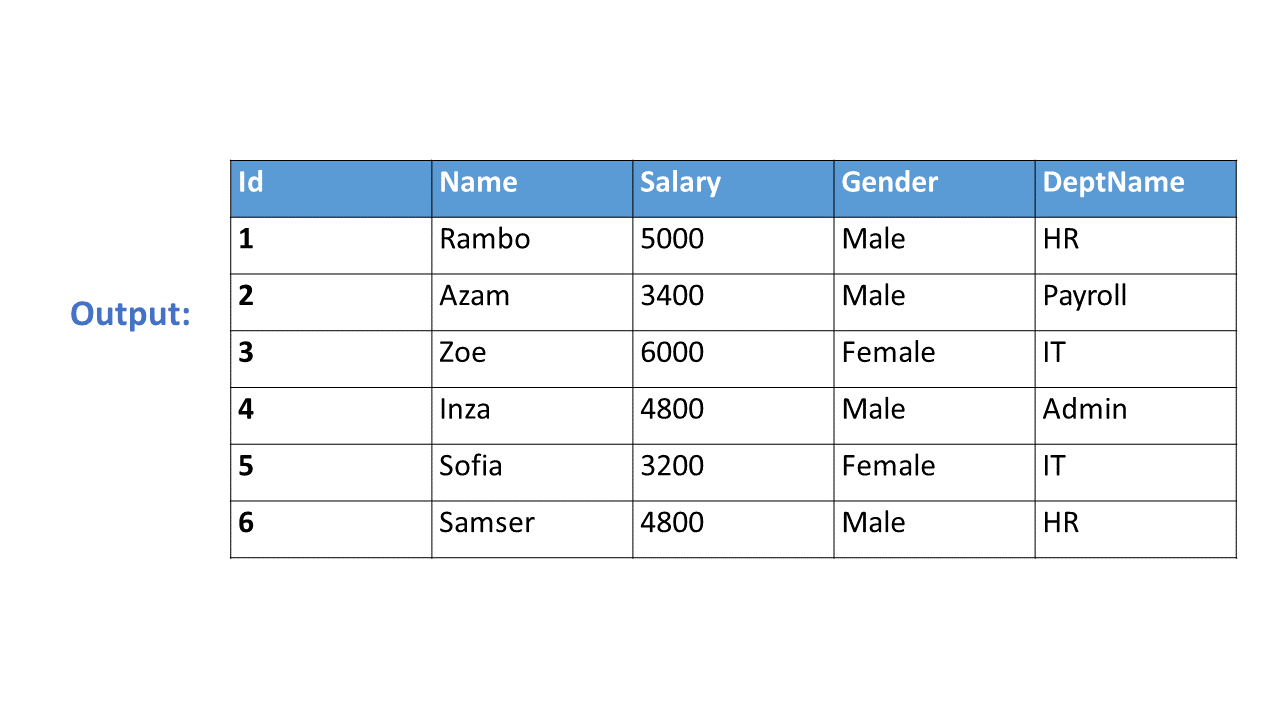
To get the expected output, we need to join tblEmployees table with tblDepartments table.
Join:
Select Id, Name, Salary, Gender, DeptName
from tblEmployee
join tblDepartment
on tblEmployee.DepartmentId = tblDepartment.DeptId
Now let's create a view, using the JOINS query, we have just written.
Create View vWEmployeesByDepartment
as
Select Id, Name, Salary, Gender, DeptName
from tblEmployee
join tblDepartment
on tblEmployee.DepartmentId = tblDepartment.DeptId
To select data from the view, SELECT statement can be used the way, we use it with a table.
SELECT * from vWEmployeesByDepartment
When this query is executed, the database engine actually retrieves the data from the underlying base tables, tblEmployees and tblDepartments. The View itself, doesnot store any data by default. However, we can change this default behaviour, which we will talk about in a later session. So, this is the reason, a view is considered, as just, a stored query or a virtual table.
Advantages of using views:
1. Views can be used to reduce the complexity of the database schema, for non IT users. The sample view, vWEmployeesByDepartment, hides the complexity of joins. Non-IT users, finds it easy to query the view, rather than writing complex joins.
2. Views can be used as a mechanism to implement row and column level security.
Row Level Security:
For example, I want an end user, to have access only to IT Department employees. If I grant him access to the underlying tblEmployees and tblDepartments tables, he will be able to see, every department employees. To achieve this, I can create a view, which returns only IT Department employees, and grant the user access to the view and not to the underlying table.
View that returns only IT department employees:
Create View vWITDepartment_Employees
as
Select Id, Name, Salary, Gender, DeptName
from tblEmployee
join tblDepartment
on tblEmployee.DepartmentId = tblDepartment.DeptId
where tblDepartment.DeptName = 'IT'
Column Level Security:
Salary is confidential information and I want to prevent access to that column. To achieve this, we can create a view, which excludes the Salary column, and then grant the end user access to this views, rather than the base tables.
View that returns all columns except Salary column:
Create View vWEmployeesNonConfidentialData
as
Select Id, Name, Gender, DeptName
from tblEmployee
join tblDepartment
on tblEmployee.DepartmentId = tblDepartment.DeptId
3. Views can be used to present only aggregated data and hide detailed data.
View that returns summarized data, Total number of employees by Department.
Create View vWEmployeesCountByDepartment
as
Select DeptName, COUNT(Id) as TotalEmployees
from tblEmployee
join tblDepartment
on tblEmployee.DepartmentId = tblDepartment.DeptId
Group By DeptName
To look at view definition -
sp_helptext vWName
To modify a view -
ALTER VIEW statement
To Drop a view -
DROP VIEW vWName